


Fall Alert – My Medic Watch
3.122.00 Reviews
App Specs
- Version
- F-2.2.11
- Updated On
- License
- Free
- Downloads
- 10,000+
- Developer
- My Medic Watch
- Categories
- Medical
- Platform
- Android
Screenshots
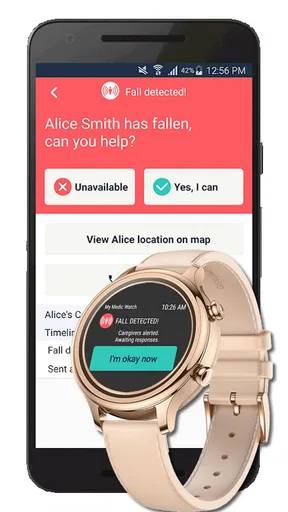
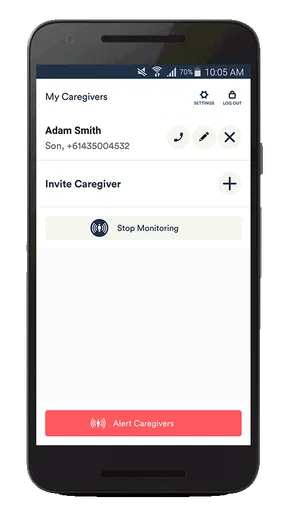
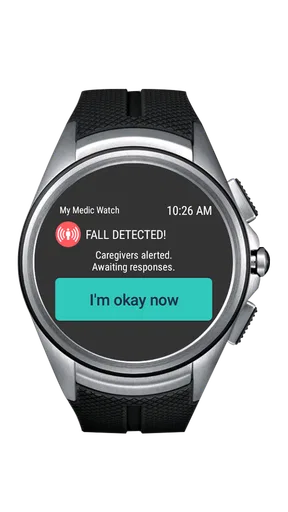
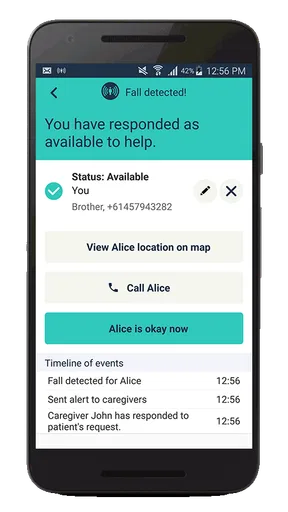
 Analysis by AppCompare
Fall Alert – My Medic Watch is the kind of medical app I would consider when the main worry is what happens after a fall, especially if getting to a phone quickly may be difficult. Its focus is automatic fall detection, rather than general fitness tracking or a broad health dashboard. That narrow purpose is useful because it keeps the idea easy to understand: the app is intended to help raise a fall alert when a serious fall is detected.
I approached it as a first-time user would, looking for a reassuring path from installation to a meaningful first test. The experience is not about collecting lots of health data or replacing medical care. It is about preparing a safety tool before an incident occurs, then understanding what it can and cannot do in everyday life. That distinction matters more here than a long feature list.
What Fall Alert is really for
Developed by My Medic Watch, Fall Alert sits in the medical category and is available as a free app for everyone. The current version is F-2.2.11, and the app has passed the early-adoption stage with over ten thousand installs. Its average rating is 3.1 from around seventy-seven ratings, with about twenty-two written reviews. I read that combination as a sign to approach it with interest but also with realistic expectations: the concept is valuable, while the day-to-day experience deserves careful setup.
The best match is someone who faces a meaningful risk of falling and wants an additional layer of protection while moving around normally. That could include an older adult, a person recovering from an injury, or someone whose family wants a fall-focused safety option rather than a full medical monitoring platform. It may also appeal to a caregiver who wants the person using the phone to have a simple, purpose-built emergency aid.
It is not the right choice if you expect a guaranteed emergency response, a substitute for supervision, or a complete personal alarm service. Automatic detection can be affected by how a fall happens, where the phone is placed, and whether the app is able to operate as intended. I would treat it as one part of a safety plan, alongside a charged phone, trusted contacts, and a clear understanding of what to do after an alert.
The short description, “Fall Alert,” is accurate but tells a first-time user very little about the practical side. The important question is not simply whether the app detects a fall. It is whether you have prepared it well enough that an alert can become useful when you need help. That is why the setup deserves as much attention as the detection itself.
Start with the person who will carry the phone
Before installing it, I would decide who is actually going to use the app and in which situations. A phone left on a bedside table cannot help during a fall in the garden, bathroom, hallway, or outside the home. Likewise, a person who regularly changes pockets, bags, or clothing should think about keeping the device in a consistent and practical place.
Worth Reading Before You Choose

Flipboard Shows What News Apps Must Do Beyond the Feed

Switching to Android Auto Means Rethinking Your Driving Routine

Google Calendar Makes a Crowded Week Easier to Manage

Ludo King Makes the Most of the Minutes Between Plans

Baby Panda World Brings Quick Play to Modern Phones, but Its Game Library Feels Busy

ESPN’s Live Game View Makes Following Close Games Easier
This is one of the less obvious trade-offs with any phone-based fall tool: convenience and detection reliability can pull in opposite directions. The phone needs to be close enough to the user to sense movement, but the user should not feel forced to carry it in an uncomfortable way. I would test the chosen carrying habit during ordinary activities before relying on it.
Set it up slowly rather than tapping through
My first recommendation is to install Fall Alert when the person using it is calm and has time to read each screen. Medical safety apps are poor candidates for rushed setup. Work through the app’s instructions carefully, allow only the access it genuinely requests for its operation, and keep the phone charged. I would also check that the app remains available in the way the phone expects, rather than assuming that installation alone completes the preparation.
Because the app is free to download but includes optional in-app purchases ranging from $2.99 to $130.00 per item, I would pay attention to any purchase screen during setup. A free starting point does not necessarily mean every available service or option is included without charge. If another family member is helping with installation, I would make sure the eventual user understands which parts are free and which choices may lead to a purchase.
The age rating is Everyone, which makes the app broadly accessible from a store perspective. That should not be confused with suitability for every health situation. A child, an older adult, and a person with a neurological condition may all interact with fall detection differently. The person or caregiver should judge whether the app fits the actual risk, rather than relying on the age label alone.
Make the first meaningful success a controlled check
I would not begin by staging a hard fall. That creates an unnecessary injury risk and tells you little if the result is unclear. A better first success is confirming that the app is installed, prepared, and understood: know where the phone will be carried, know what an alert is supposed to do, and know who will respond if one occurs.
If the app provides an on-screen way to verify its readiness or demonstrate its alert process, use that rather than improvising a dangerous test. If a trusted family member is involved, have that person nearby during the first check. The goal is to learn the sequence from detection to response without turning the test into a medical emergency.
This also exposes a practical weakness that store summaries rarely mention: an alert system is only as useful as the response around it. If nobody knows what a notification means, or if the intended contact does not check their phone, the technical detection may not lead to timely help. I would explain the plan in plain language to everyone involved and repeat it after any major phone change.
What a normal day with the app may look like
Once prepared, the app should fit into the background of daily life. I would carry the phone consistently while walking through the home, using stairs, shopping, or spending time outdoors. The point is not to open the app constantly. The point is to establish a dependable habit so the safety tool is present during the moments when it matters.
Consider a realistic scenario: someone gets up at night, walks toward the kitchen, and slips in a dim hallway. If the phone is being carried and the detection process works as intended, Fall Alert may provide an important route toward raising attention. But the person still needs to understand what happens next. Can they respond to the phone? Is a family member expecting an alert? Is the phone close enough to hear or reach? Those questions should be answered before the first night of use.
I would also review the setup after changes in routine. A new coat, a different handbag, a replacement phone, or a move to another room can alter how the person carries the device. This is a concrete maintenance habit that adds more value than simply installing the app and forgetting it. Fall detection is not a set-and-forget promise; it is a prepared routine.
Common confusion about automatic detection
The word “automatic” can create false confidence. It does not mean every fall will be recognized perfectly, nor does it mean the app can understand the seriousness of an injury. A slow slide, a collapse against furniture, or a fall where the phone is separated from the body may behave differently from a clear impact. I would never use the app as permission to take risks or to leave a vulnerable person without appropriate support.
False alerts are another possibility to think about. A sudden movement, dropped phone, or unusual activity could potentially create an alert depending on how the detection works in practice. That is not automatically a failure; sensitivity and convenience involve a trade-off. However, the user and their contacts should know how to recognize an accidental alert and how to respond without panic.
There is also a difference between detecting a fall and confirming that help has arrived. The app can be part of the first step, but it does not remove the need for communication. I would keep emergency instructions visible somewhere the user and family can find them, and I would make sure the person knows how to call for help directly if they are able to do so.
Another source of confusion is assuming that the app replaces a dedicated medical alarm. A specialist alarm device may be preferable for someone who cannot reliably carry a smartphone, needs a wearable designed for constant use, or requires a service with a clearly defined response process. Fall Alert is more attractive when the user already carries a compatible phone and wants a focused, lower-barrier safety option.
How it compares with ordinary alternatives
The most basic alternative is calling a family member manually. That costs nothing and works well when the person can reach the phone, unlock it, and make the call. Its weakness is obvious: a serious fall may leave the user confused, injured, or unable to reach the device. Automatic detection addresses that specific gap, which is why the app can be worthwhile even though it is not a complete emergency system.
Another alternative is a general smartwatch or phone health feature. Those products may offer broader activity tracking and other wellness tools, but they can also be more complicated, more expensive, or less focused on a single safety task. Fall Alert makes more sense for someone who wants to concentrate on fall alerts rather than learn a large health ecosystem.
A dedicated personal alarm can be stronger for users who need a wearable button, two-way communication, or a professionally managed response. It may also be easier for someone who does not want to manage a smartphone. On the other hand, a dedicated system can involve equipment, subscriptions, or a more involved setup. Fall Alert’s free entry point makes it easier to explore, while the available in-app purchase range means the final experience should be checked carefully before committing to paid options.
My view is that Fall Alert occupies a useful middle ground. It is more proactive than relying solely on a manual phone call, but less comprehensive than a dedicated monitored alarm service. That middle ground is its strength for some households and its limitation for others.
Small habits that improve the experience
Keep the phone in the same practical location during the activities where falling is most likely, and reassess that location when clothing or routines change.
Tell a trusted person what an alert means and agree on the first response, rather than assuming they will understand it automatically.
Check the app after a phone replacement, operating-system change, or long period without use so the safety routine has not been forgotten.
Use a supervised readiness check instead of staging a dangerous fall, and stop immediately if any test could cause injury.
Keep a manual way to call for help available, because automatic detection should be treated as an additional layer rather than the only plan.
These habits are especially important for a caregiver. I would not simply install the app on someone else’s phone and leave. I would involve that person in choosing where the phone goes, explain what an alert means, and revisit the arrangement after a week of normal use. A solution that the user dislikes and stops carrying is less useful than a simpler plan they will follow consistently.
Where the app earns trust, and where it does not
The clearest strength is focus. Fall Alert does not ask me to navigate a large collection of unrelated health tools before reaching the central purpose. For a person specifically concerned about falling, that directness can reduce decision fatigue. The free starting price also lowers the barrier to trying the concept, although paid choices should be considered carefully.
The main limitation is that no phone app can remove the uncertainty surrounding a real fall. Detection depends on circumstances, carrying habits, phone readiness, and the response plan afterward. The middling average rating also encourages me to recommend a cautious trial rather than an unquestioning endorsement. I would use it as a supplement to sensible safety planning, not as proof that a person is fully protected.
I would skip it for someone who rarely carries a phone, cannot manage the device without assistance, or needs guaranteed professional monitoring. I would also look elsewhere if the household wants extensive health records, medication management, or a wearable built specifically for continuous emergency communication. Fall Alert is strongest when the need is narrower: help with the possibility of a fall, using a smartphone the person is already willing and able to carry.
The next step after installation
My recommendation is to begin with a calm setup, a consistent carrying habit, and a supervised confirmation of the alert process. Then use the app during ordinary routines rather than waiting for a dramatic test. After that first period, ask a simple question: does the person actually keep the phone with them, and does everyone know how to respond?
If the answer is yes, Fall Alert may be a sensible extra layer for a household concerned about falls. If the answer is no, changing the routine or choosing a dedicated alarm may be more effective than repeatedly reinstalling the app. The right safety tool is the one that matches the person’s abilities and habits.
Overall, I see Fall Alert – My Medic Watch as a focused medical utility with a worthwhile purpose and realistic boundaries. I would recommend it to a first-time user who wants to explore automatic fall detection without immediately adopting a full monitoring system. I would just make the recommendation with one important condition: prepare the response plan before trusting the alert. That preparation is what turns a promising installation into something genuinely useful.
Pros
- Automatic fall detection can alert contacts when the wearer cannot use the phone.
- Useful for older adults
- people living alone
- and users with mobility concerns.
- Can provide reassurance to family members during everyday activities.
- Designed to support emergency communication through a wearable device.
- May help users remain more independent without constant supervision.
Cons
- Fall detection may occasionally trigger false alarms during sudden movements.
- Requires compatible hardware and a properly charged wearable to work reliably.
- Some features may depend on an active subscription or service plan.
- Indoor positioning and signal quality can affect emergency response information.
- Users should not rely on it as a replacement for professional medical assistance.
FAQs for Fall Alert – My Medic Watch
What is Fall Alert – My Medic Watch, and how does it work?
Fall Alert – My Medic Watch is a personal safety app designed to help detect a possible fall and connect the user with assistance. After installation and setup, it may use information from a compatible wearable device, phone sensors, or both, depending on the supported configuration. When a fall is suspected, the app can provide an alert and allow the user to request help. Its exact functions may vary by device, region, subscription, and service availability.
Does Fall Alert – My Medic Watch automatically contact emergency services after a fall?
Users should not assume that every detected fall automatically results in a call to emergency services. The response may depend on the selected monitoring plan, account settings, location, network connection, wearable compatibility, and whether the user cancels or confirms the alert. Before relying on the app, carefully review its emergency-response process and configure the correct contacts or monitoring service. It should complement, not replace, normal emergency procedures.
What devices and permissions are required to use the app?
The app may require a compatible Android or iPhone, and some features can depend on a supported smartwatch or My Medic Watch wearable. During setup, it may request access to motion sensors, Bluetooth, location, notifications, microphone, phone functions, and background activity. These permissions help the service detect events and communicate alerts, but availability differs between operating systems and device models. Check the store listing and compatibility information before downloading.
Can Fall Alert – My Medic Watch work without an internet or mobile connection?
Fall detection and alert delivery generally depend on the phone or wearable having sufficient battery, an active connection, and permission to operate in the background. Without mobile service, Wi-Fi, GPS availability, or a paired device connection, some functions may be delayed or unavailable. A weak signal can also affect communication with contacts or monitoring staff. For safety, users should test the complete setup in the places where they normally spend time.
Is Fall Alert – My Medic Watch free, and are there privacy or subscription considerations?
Downloading the app may be free, but access to professional monitoring, emergency assistance, wearable hardware, or advanced features can require a paid plan or separate service agreement. Review in-app pricing, renewal terms, cancellation rules, and regional availability before subscribing. Because the app may handle health, location, and emergency-related information, also read its privacy policy to understand what data is collected, how it is used, and with whom it may be shared.


